Tag Archives: home tv installation

TV Installation Manly Northern Beaches

TV Installation Manly Northern Beaches

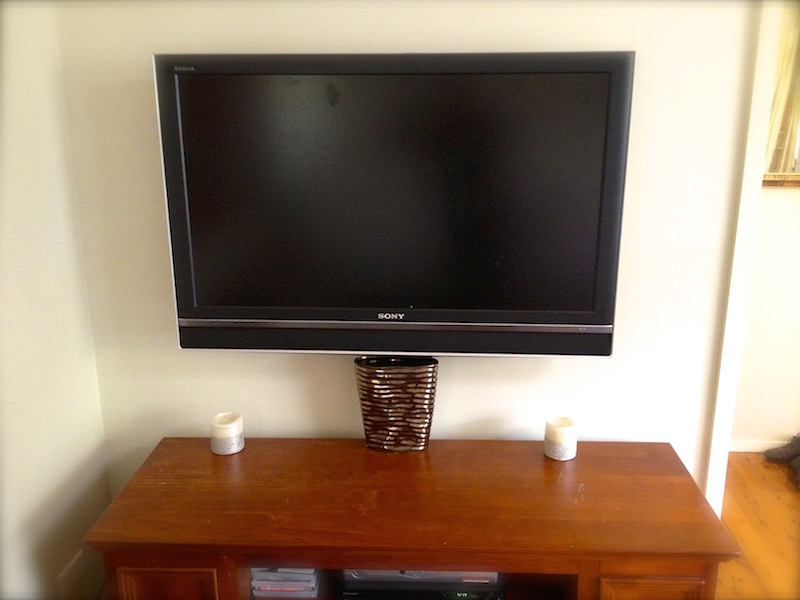
This TV was wall mounted in the customer kitchen in Manly in the Northern Beaches Sydney.  The customer specifically wanted the tv up high so that it was out of tech of the children.

“That TV Guy” will then connect all your existing equipment to your new tv then show you how to use it, also leaving step by step instructions if required.

TV Installation Manly Northern Beaches

“That TV Guy” can also help you with:

  • DVD / HDD recorders
  • Foxtel
  • Internet TV
  • Smart TV’s
  • Surround sound
  • Blu Ray / DVD

Before you buy anything give “That TV Guy” a call on 0401 202 087 and we can advise you on what to buy that is best for you and your needs.

“That TV Guy” can also copy your old memorable video taped onto DVD’s.

Give Peter a call today on 0401 202 087

Visit the website or send an email.
tv-installation-northern-beaches-north-shore-Sydney


What is HDMI-CEC?

What is HDMI-CEC?

HDMI-CEC is a a feature that is built into most consumer electronics today with HDMI. It is a built in system for allowing your Audio and Video components to Communicate with each other. But, in order for it to work, your devices must support HDMI-CEC. Not all HDMI components support HDMI-CEC. Although, HDMI-CEC goes by many names depending on the manufacturer. Here are some other names that are the same as HDMI-CEC: Anynet or Anynet+ (Samsung); Aquos Link (Sharp); BRAVIA Sync (Sony); HDMI-CEC (Hitachi); Kuro Link (Pioneer); CE-Link and Regza Link (Toshiba); RIHD (Remote Interactive over HDMI) (Onkyo); SimpLink (LG); HDAVI Control, EZ-Sync, and VIERA Link (Panasonic); EasyLink (Philips).

What is HDMI-CEC?If you have any questions don’t hesitate to call Peter from “That TV Guy” on 0401 202 087.

That TV Guy” can help you with all your audio visual needs:

  • Television – LCD & plasma
  • Digital TV & set top boxes
  • DVD players / recorders
  • HDD recorders
  • Home theatre
  • Surround sound systems
  • Internet TV
  • 3D TV
  • Foxtel / Optus
  • Accessories and cabling
  • Wall mounting

For help with all your audio visual problems contact Peter on 0401 202 087

tv-installation-northern-beaches-north-shore-Sydney

TV wall mount Frenchs Forest Northern Beaches

TV wall mount Frenchs Forest Northern Beaches

That TV Guy” has just wall mounted a 42in Sony LCD and connected the customers existing Foxtel and DVD player.  Call Peter on 0401 202 087.

The wall bracket mounting the tv was supplied and fitted to the customers liking.   When choosing the hight of the tv we put masking tape on the wall at 10cm increments.   2 people then slowly lift each side of the television so that the customer can be in their normal seating position and get a realistic view on how high they want the tv.

TV wall mount Frenchs Forest Northern BeacheThat TV Guy can help you with all your audio visual needs:

  • TV wall mounting
  • TV installations (plasma, LCD, LED)
  • TV set up/tuning
  • Smart TV’s
  • DVD/Blu-ray
  • HDD recorders
  • Surround sound

Contact Peter from “That TV Guy” for any advice on what to buy.  0401 202 087

We can also copy your old VHS tapes onto DVD’s.

Visit the website or send an email

tv-installation-northern-beaches-north-shore-Sydney


Amplifier connections explained

 Amplifier connections explained

Your amplifier has many plugs when you turn it around and have a look at the rear. Amplifiers have changed over the years and can be very confusing when needing to be set up to your TV, DVD, Blu-ray etc.

Amplifier connections explained

Here is a brief explanation of the inputs:

Digital In – is for connecting digital audio from your DVD, Blu-ray etc. This can be done by using a coaxial or optical cable.

Amplifier connections explained


AV Inputs
– this is a more basic way of connecting your DVD, Foxtel etc with the yellow, red and white RCA cables.

Component video – for connecting analog video from a DVD etc using component cables, 9/10 connection.

HDMI in – for connecting your Blu-Ray, HD Foxtel etc, 10/10 connection (video and audio).

HDMI out – connecting the amplifier to the TV via a HDMI cable, 10/10 connection.

Monitor out – connecting the amplifier to the TV with composite cables, 4/10 connection.

Sub pre-out – this is for connection of an active (powered) subwoofer.

Speaker terminals – for the connection of your speakers (front left, front right, centre, real left and rear right).

If you have any more questions please don’t hesitate to call Peter from That TV Guy for any advice on 0401 202 087.

“That TV Guy” can help you set up and install:

  • TV installations
  • LED / LCD / Plasma installs
  • Wall mounting
  • Digital TV
  • DVD / Blu-ray setup
  • PVR / HDD recorder set ups
  • Surround sound
  • Home theatre
  • Internet TV
  • Smart TV
  • VHS tapes to DVD transfers

Contact Peter on 0401 202 087, visit the website or email.

INSTALLATION, SETUP AND ADVICE

tv-installation-northern-beaches-north-shore-Sydney