Tag Archives: tv installer

Amplifier connections explained

 Amplifier connections explained

Your amplifier has many plugs when you turn it around and have a look at the rear. Amplifiers have changed over the years and can be very confusing when needing to be set up to your TV, DVD, Blu-ray etc.

Amplifier connections explained

Here is a brief explanation of the inputs:

Digital In – is for connecting digital audio from your DVD, Blu-ray etc. This can be done by using a coaxial or optical cable.

Amplifier connections explained


AV Inputs
– this is a more basic way of connecting your DVD, Foxtel etc with the yellow, red and white RCA cables.

Component video – for connecting analog video from a DVD etc using component cables, 9/10 connection.

HDMI in – for connecting your Blu-Ray, HD Foxtel etc, 10/10 connection (video and audio).

HDMI out – connecting the amplifier to the TV via a HDMI cable, 10/10 connection.

Monitor out – connecting the amplifier to the TV with composite cables, 4/10 connection.

Sub pre-out – this is for connection of an active (powered) subwoofer.

Speaker terminals – for the connection of your speakers (front left, front right, centre, real left and rear right).

If you have any more questions please don’t hesitate to call Peter from That TV Guy for any advice on 0401 202 087.

“That TV Guy” can help you set up and install:

  • TV installations
  • LED / LCD / Plasma installs
  • Wall mounting
  • Digital TV
  • DVD / Blu-ray setup
  • PVR / HDD recorder set ups
  • Surround sound
  • Home theatre
  • Internet TV
  • Smart TV
  • VHS tapes to DVD transfers

Contact Peter on 0401 202 087, visit the website or email.

INSTALLATION, SETUP AND ADVICE
tv-installation-northern-beaches-north-shore-Sydney


Digital TV are you ready?

Digital TV are you ready?

The old “Analog TV” signal is going to be switched off by the 3rd of December 2013 in Sydney.  In many areas in Australia this has already been completed.  If you already have a digital TV, digital set top box or Foxtel you have already made the digital switch so you will be fine.   This means you are already receiving the extra digital channels, HD channels and the electronic program guide.

Digital TV are you ready

If you haven’t already got a digital TV, digital STB or Foxtel you will need at the minimum adigital set to box.   These days they are pretty cheap, starting at about $30 at your local electronics shop (e.g. Dick Smith).

Digital TV are you ready

If you currently are receiving digital television without any problems you will not have to change your current antenna.   Antennas made for analog tv signals work just as good for the new digital tv signals so save your money.

Digital TV are you ready

INSTALLATION, SETUP AND ADVICE

Northern Beaches & North Shore Sydney

If you need any more advice or help please don’t hesitate to call Peter from “That TV Guy” on 0401 202 087 or visit the website or email.tv-installation-northern-beaches-north-shore-Sydney

What is 5.1 surround sound

What is 5.1 surround sound

5.1 surround sound means 5 channels (front left, centre, front right, rear left & rear right) of audio sound and the “point one” is the low frequency sub-woofer.   The 5 speakers are designed to surround the listener just like in the movie theatres.

What is 5.1 surround sound

The centre speaker is designed to send the voices from the movie to the listener.   The left and right front speakers give you the big sound effects and the rear speakers give the listener the added sound effects.   The “.1” is the sub-woofer giving you the bass.

Peter from “That TV Guy” can help you with all your Audio Visual needs.  Help is only a phone call away – 0401 202 087

Services include:

  • TV installations
  • LED / LCD / Plasma installs
  • Wall mounting
  • Digital TV
  • DVD / Blu-ray setup
  • PVR / HDD recorder set ups
  • Surround sound
  • Home theatre
  • Internet TV
  • Smart TV
  • VHS tapes to DVD transfers

Contact Peter on 0401 202 087, visit the website or email.

INSTALLATION, SETUP AND ADVICE

tv-installation-northern-beaches-north-shore-Sydney


RCA cables explained

RCA cables explained

An RCA cable is used to carry audio and video signals.


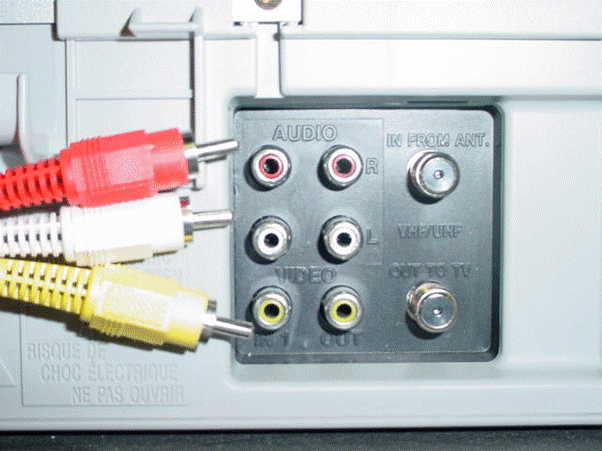
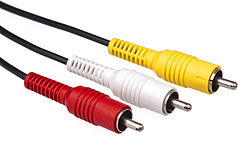
The name RCA comes from “Radio Corporation of America” which is a simple and low cost designed cable.   These cables transmit signals from your DVD and VCR etc to your TV.   These cables are therefore colour coded so that you insert the correct cable into the correct input on the back of the device.   (see image to right)

RCA cables explained

Composite & Audio cables carry a video signal (yellow) and the left and right audio signals (red and white)   These cables are rated a 4/10 connection.   Mainly used for older TV’s, VCR’s and DVD’s.

RCA cables explained


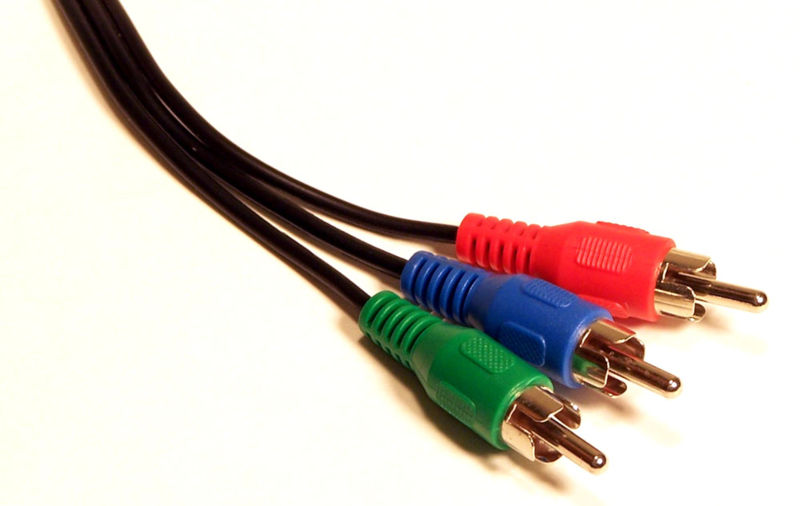
Component Cables (red, green and blue) transmit 3 analogue

video signals from your device to your television. Transmitting twice the resolution as composite video (red, yellow, white), this is often preferred for those with higher definition televisions. These cables are rated a 9/10.

RCA cables explained


If you have any more questions or are in the need of any advice don’t hesitate to contact Peter from “That TV Guy” your local TV expert on the Northern Beaches and North Shore Sydney.  Call 0401 202 087, visit the website or email.

TELEVISION INSTALLATION, SETUP AND ADVICE

tv-installation-northern-beaches-north-shore-Sydney